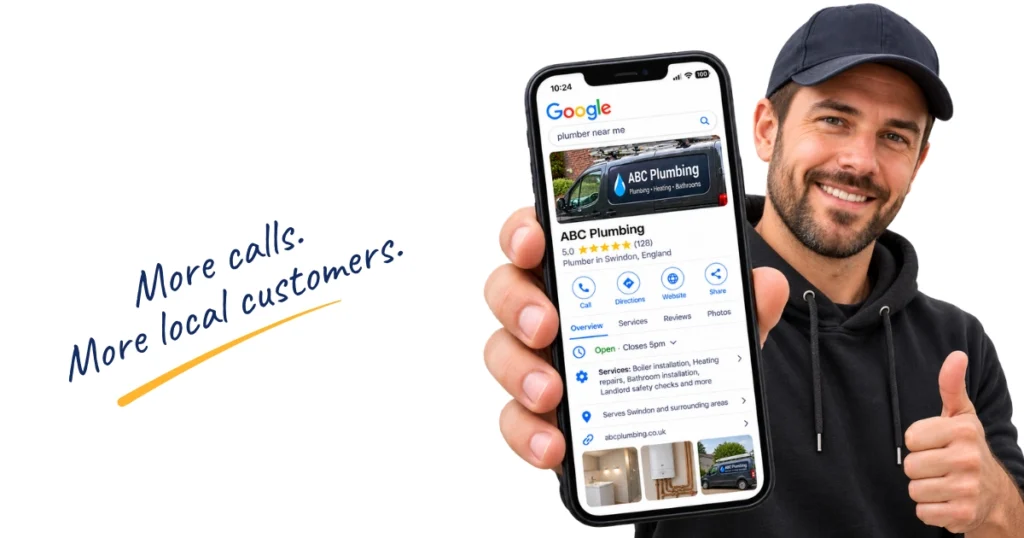
If you run a local trade business, your Google Business Profile can be one of the first things a potential customer sees.
They might find it when they search for your business by name, look for a plumber nearby or search Google Maps for an electrician, landscaper, roofer or another local trade.
Before they even reach your website, they could already be looking at your reviews, photos, services, opening hours and contact details.
That’s why your Google Business Profile is worth looking after.
You don’t need to become a local SEO expert, but you do want your profile to give Google accurate information about your business and give potential customers plenty of reasons to trust you.
Here’s where I’d concentrate your time.
Start with the basic business information
Before worrying about posts, photos or clever Google tricks, check the information customers actually rely on.
Your business name, phone number, website, opening hours and address or service area should all be accurate and up to date.
Google says businesses with complete and accurate information are more likely to appear in relevant local search results.
Use your real business name
Your Google Business Profile should use the name you actually trade under.
If you’re called ABC Plumbing Ltd, don’t change it to:
ABC Plumbing Ltd | Emergency Plumber | Boiler Repairs | Bathrooms Manchester
It can be tempting to squeeze extra services and locations into the name, especially when you see competitors doing it, but Google says your profile should reflect the name your business uses in the real world.
There are other places to tell Google about your services and the areas you cover.
Check your phone number and website
This sounds obvious, but it’s worth checking.
If someone presses the call button, does it go to the right number?
Does your website link still work and take them somewhere useful?
Your profile might have been created years ago. Businesses change phone numbers, websites and working hours, but Google can easily be forgotten.
Keep your opening hours current
Add the hours when customers can contact or visit the business and update them when something changes.
Google also lets you set special hours for holidays, bank holidays and other occasions when your normal hours don’t apply.
These are small details, but they’re exactly the sort of things a customer may check before deciding whether to contact you.
If you travel to customers, check your service areas
This part is particularly relevant to trades.
If you run your business from home but travel to customers, you probably don’t want your home address displayed publicly on Google.
Google calls a business that visits customers but doesn’t serve them at its own address a service-area business. In fact, Google uses plumbers as one of its examples.
If that’s how your business operates, Google says you should remove your address from the public profile and use service areas instead.
You can currently add up to 20 service areas, based on places such as towns, cities and postcodes. Google no longer lets you define your service area using a radius.
It also recommends keeping the overall area realistic, generally within around two hours’ driving time from where the business is based.
That doesn’t mean you need to use all 20.
Choose the places you genuinely work in rather than adding every town you can think of.
And there’s one common misunderstanding worth clearing up.
Adding a town to your service areas doesn’t guarantee that you’ll rank in that town.
Your service areas help describe where you work. Google still considers other factors when deciding which businesses appear in local results.
Choose the category that best describes your business
Your business category helps Google understand what kind of business you run.
You’ll have a primary category and, where relevant, you can add additional categories.
The primary one should be the closest match to the main business.
Depending on what you do, that could be something like:
- Plumber
- Electrician
- Roofing contractor
- Painter and decorator
- Landscaper
- Pest control service
You can add other categories if they genuinely describe other parts of the business, but don’t add vaguely related categories just because they’re available.
Google specifically advises against using categories purely as keywords.
It’s worth checking this every so often too. If the business has changed direction since you originally created the profile, the category you chose a few years ago might no longer be the best fit.
Tell people what you actually do
Once the basics are right, have a look at your business description and services.
Together, these can make it much easier for someone to understand what they can actually hire you for.
Your business description
Your description doesn’t need to sound like it was written for Google.
Write it for the customer.
Explain what the business does, who you work with and the main types of work you take on. You can also mention useful information such as your experience, qualifications or the general area you cover where relevant.
Avoid turning it into a giant list of locations and search phrases.
Someone reading it should come away with a clear idea of what your business does and whether you might be the right person for their job.
Add the services you want enquiries for
This is one part of your Google Business Profile I’d definitely spend some time on.
Rather than expecting somebody to work everything out from a broad category such as Plumber, add the individual services you actually provide.
For example:
- boiler installation
- boiler servicing
- landlord gas safety checks
- bathroom installation
- radiator replacement
- plumbing repairs
Obviously, those examples will change depending on your trade.
Google allows eligible service businesses to add suggested and custom services. You can group services into categories and add information such as descriptions and prices. Google also says a relevant service may be highlighted on your profile when somebody searches for something you provide.
Think about the jobs you actually want more of.
If a service is profitable, you regularly provide it and you want customers contacting you about it, make sure your profile reflects that.
Rather have someone sort this out for you?
You can absolutely work through all of this yourself.
But if you’ve opened your profile and discovered you’re not sure whether the categories are right, your service areas make sense or half the profile is missing, I also offer a one-off Google Business Profile optimisation service for tradespeople.
I’ll go through the profile and sort the main areas for you, so you’ve got a much better starting point.
Use photos to show customers what your business is really like
For a trade business, your photos can do a lot of the talking.
Someone considering hiring you doesn’t need endless generic stock images. They want to see evidence of the work you actually do.
Useful photos might include:
- finished jobs
- before and after photos
- work in progress
- different types of work you offer
- you or your team working
- branded vans and workwear
- your premises, if customers visit you
Google encourages businesses to add photos and videos so customers can see what they offer.
There’s no magic number of photos you need to upload to guarantee better rankings.
But that doesn’t mean you should upload five photos when you create the profile and never touch them again.
Adding recent work over time gives potential customers a much better picture of what you’re doing now. If your latest photos are several years old, they may no longer represent the standard of your work, the services you offer or even what the business looks like today.
The easiest way to keep on top of this is to take photos as you work. A couple of extra minutes before you leave a good job can give you photos for your Google Business Profile, website and social media.
Not sure which photos are worth taking? I’ve made a free Job Photo Checklist for Trades that you can save to your phone and use while you’re working.
Google reviews are worth paying attention to
Reviews can make a big difference to how somebody sees your business.
Imagine a customer finds three local heating engineers.
One has a handful of reviews from several years ago. Another has plenty of reviews but quite a few unhappy customers. The third has a steady collection of positive reviews from customers talking about the quality of the work and their experience.
Those profiles don’t create the same impression.
Reviews aren’t only about customer trust either.
Google specifically says that more reviews and positive ratings can help local ranking.
So building a genuine collection of customer reviews is one part of your Google Business Profile that’s well worth working on.
Make leaving a review easy
Google lets you create a direct review link or QR code for your business.
Save the link somewhere easy to find so you aren’t hunting for it every time you finish a job.
Then ask.
You don’t need to make it awkward or give customers a big speech. One of the best opportunities is when somebody has just told you they’re happy with the work.
Send the link while the job is still fresh in their mind.
What you shouldn’t do is offer a discount, freebie or another reward in exchange for a review. Google prohibits incentivised reviews.
Not sure what to say when you ask? I’ve made a free Google Review Request Pack with ready-to-use messages you can adapt and send to your customers.
Reply to your reviews too
It’s worth responding to the reviews people leave.
Google recommends replying to reviews because it shows customers that their feedback matters.
Your replies are also public, so potential customers can see how you communicate.
That doesn’t mean every response needs to be an essay.
If somebody leaves a lovely review, thank them.
If they’ve mentioned something specific about the job, acknowledge it.
And please don’t feel you have to turn every reply into:
Thanks Dave for choosing ABC Plumbing for your BOILER INSTALLATION IN MANCHESTER.
It doesn’t sound natural.
If you receive a negative review, avoid getting dragged into an argument. Respond professionally, address anything that genuinely needs addressing and try to move the conversation offline where appropriate.
A calm response can say quite a lot about a business, particularly to the next customer reading it.
Keep your profile active with useful updates
Getting your Google Business Profile set up properly isn’t the end of the job.
Businesses change. You complete new work. You get new reviews. Seasons change. Services change. Photos get old.
Your profile should keep up.
Google Business Profile posts let you share updates, offers and events directly on your profile in Google Search and Maps. Google says posts can be used to share current information and help customers make decisions about a business.
For a tradesperson, you could post about:
- a recently completed job
- a service you want more enquiries for
- seasonal work
- an offer you’re currently running
- availability
- something new in the business
- useful advice for customers
I like a weekly update for a trade business where there’s enough useful content to share.
It creates a routine and means you’re regularly adding fresh examples of what the business is doing rather than leaving the profile untouched for months at a time.
There’s an important distinction here though.
Google doesn’t say that publishing exactly one post every week will automatically push you higher in local results.
That’s not the reason to do it.
Regular updates, recent job photos, new reviews and accurate information help keep your profile useful and give potential customers current evidence that you’re active and doing the kind of work they’re looking for.
Google also currently archives posts after six months unless a date range has been set, which is another good reason not to think of posts as something you publish once and forget about forever.
Don’t have time to keep doing it yourself?
This is often the bit that gets forgotten.
You finish the job, pack the van, answer three missed calls, send a quote and suddenly updating Google is at the bottom of tomorrow’s list.
If you want your profile looked after without having to remember to do it yourself, I also offer ongoing Google Business Profile management for tradespeople.
That includes regular posts, review replies and ongoing attention to the profile, so it doesn’t become another marketing job you’ve got to keep remembering.
Check where you’re sending potential customers
If someone has found your profile and decided they’re interested, make the next step easy.
Check your phone number.
Check the website button.
If your business uses online appointments or bookings and your profile supports them, check those links too.
There’s no point putting effort into the profile if the final click sends somebody to an old website or a broken booking page.
Google Business Profile is part of the journey someone takes before contacting you. Make that journey as easy as possible.
What actually affects where you appear in local Google results?
This is where Google Business Profile advice can get messy.
There are plenty of tips online promising that a particular posting schedule, number of photos or secret profile change will suddenly send a business to the top of Google Maps.
Google’s own explanation is much more straightforward.
It says local results are mainly based on three things: relevance, distance and prominence.
Relevance
This is how closely your business matches what somebody is searching for.
Complete and detailed business information helps Google understand what you do and match your profile with relevant searches.
This is one reason getting your categories, services and business information right matters.
Distance
This is how far the business is from the person searching, or from the location Google believes they’re searching around.
This is also why adding 20 service areas isn’t a shortcut to ranking everywhere.
You can’t optimise your way out of geography.
Prominence
Google describes prominence as how well known a business is.
It looks at information about the business from across the web and says factors including links, reviews and ratings can contribute.
Google specifically says that more reviews and positive ratings can help local ranking.
It also makes another point worth remembering: there’s no way to request or pay Google for a better local ranking.
So be wary of anybody promising guaranteed Google Maps positions.
A better aim is to give Google clear, accurate information about your business and build a profile that gives potential customers good reasons to choose you when they find it.
Check how people are finding your profile
Once you’ve been working on your profile for a while, it’s worth looking at the Performance information Google provides.
Depending on the business and the metrics available, this can help you see how people are finding and interacting with your profile.
Don’t get obsessed with every number.
Look at the bigger picture.
Are people finding the business? What are they doing when they do? Are the services and searches you’re seeing the ones you actually want enquiries for?
You don’t need to check it every morning with your first cup of tea.
Looking periodically is enough to give you a better idea of what’s happening and whether anything needs attention.
Common Google Business Profile mistakes for tradespeople
There are a few problems worth checking for.
Stuffing services and locations into the business name. Use the genuine name of the business and put your services and locations where they belong.
Showing your home address when customers don’t visit you there. If you travel to customers and don’t serve them at your address, check whether you should be set up as a service-area business.
Adding every location you can think of. Your service areas should reflect where you genuinely work.
Choosing categories that don’t really describe the business. Concentrate on the categories that accurately represent what you do.
Setting up the profile and forgetting about it. Old photos, incorrect hours, missing services and outdated contact information don’t give customers the best picture of the business.
Ignoring reviews. Ask genuine customers for them and keep an eye on what’s being said about the business.
Offering incentives for reviews. Google doesn’t allow businesses to reward customers in exchange for reviews.
Believing every Google Maps trick you hear. If somebody tells you something will definitely improve your rankings, it’s worth checking whether Google actually says so.
Give your profile regular attention
You don’t need to spend hours every week working on your Google Business Profile.
But I wouldn’t treat it as something you set up once and forget about either.
Get the foundations right first: your business information, category, services, service areas, description, website and contact details.
Then keep building on it.
Take photos while you’re working. Ask happy customers for reviews. Reply to them. Share useful updates and recent work. Keep your hours and services current. Check your Performance information occasionally and make sure the profile still reflects the business you run today.
A little regular attention is much easier than discovering two years down the line that half the profile is out of date.
And if you’re looking at yours now thinking, “I don’t actually know which bits I’ve done”, that’s exactly why I’ve made the free Google Business Profile Checklist for Trades.
You can work through it one step at a time, get the main parts of your profile sorted and see what still needs attention.